Dashboards on Top of an AWS Data Pool: A Smart-Ring Case Study
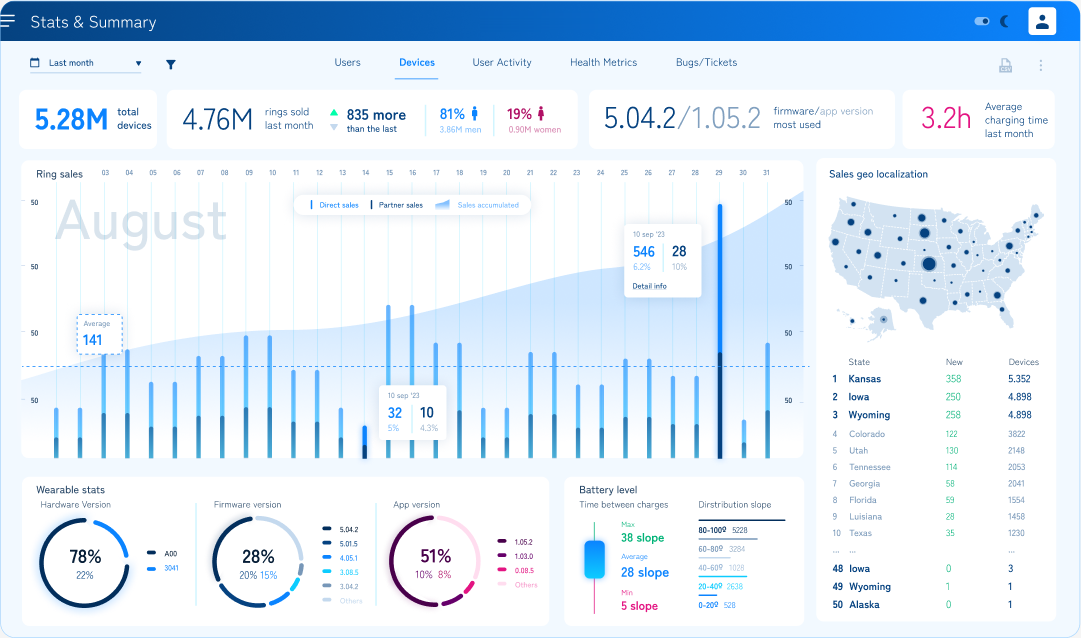
The summary dashboard design. Figures are illustrative.
We built the internal management portal for a company that makes a smart ring: a health wearable that tracks heart rate, blood oxygen, skin temperature, breathing rate, sleep and activity. The company lacked one place where its own people could see how the business was doing, and look closely at what a single customer's ring was doing.
This post walks through that portal: how we built its dashboards, how they sit on top of the company's data pool in AWS, and what we learned about charting health data in a browser.
Two audiences, one portal
The business view. Management wanted a screen they could leave open on a monitor that answered "how are we doing?" without anyone touching it: rings produced and sold, new users, sync activity, incidents and rings under repair, always compared with the previous period.
The support view. Customer support needed the opposite: find one user or one ring by serial number and see everything about it, from devices and firmware versions to the measurements themselves, down to the raw per-second signals the ring uploaded. When a customer said a reading looked wrong, this is where someone went to find out why.
Where the data comes from
The ring's app stores its data in DynamoDB and S3, which suits an app reading one user's recent data but not a dashboard comparing every user and every day. So we put a PostgreSQL data pool in between, fed continuously by Lambdas, and gave each widget its own small endpoint behind API Gateway.
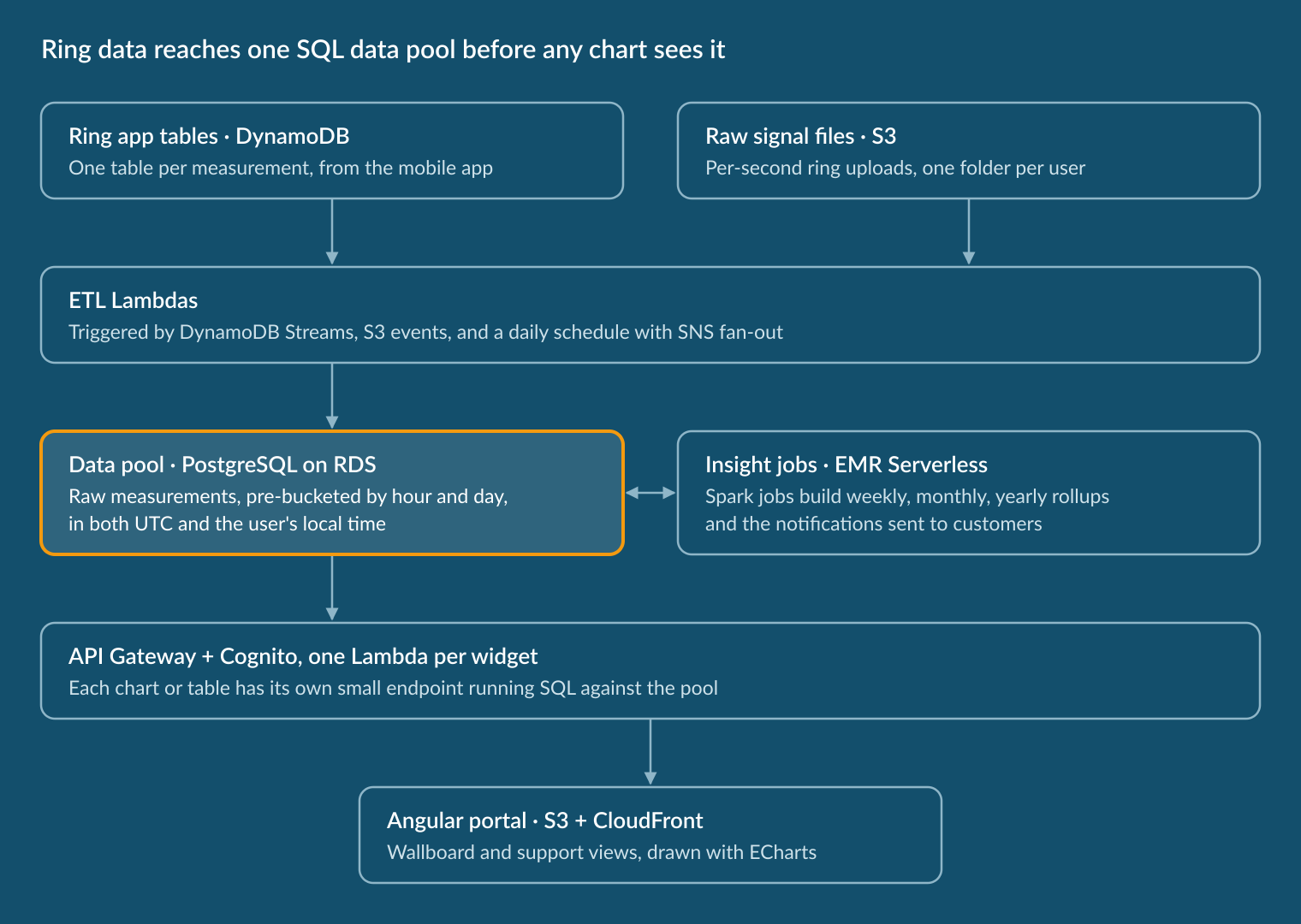
For the front end, this meant every chart could ask one specific question and get back data already shaped for it.
A wallboard people actually look at
A screen nobody touches has to change on its own, or people stop looking at it. The business dashboard is built around movement that stays readable:
- A ticker that scrolls through this month's figures against last month's, each with an up or down arrow.
- A central chart that rotates every 12 seconds through sales, activity, users, spot checks and incidents.
- Footer cards that flip between who the users are and when their rings sync.
- One period selector for week, month, year or a custom range, and a pause button, because a chart that moves while someone is pointing at it is frustrating.
The central chart shows five quite different data sets. Instead of hand-building each one, we describe each series once: its colours in dark and light mode, its gradient, whether it is drawn as bars or a smooth area, and whether it gets an average line. The chart is generated from those descriptions, so adding a new dashboard type became a matter of describing it.
Why we chose ECharts
Health data asks a lot of a chart library: several metrics with different units on one chart, a full day of per-second readings, zoom, colour that depends on the value, and clicks that drill down. We chose Apache ECharts because it handles all of that natively and leaves the look entirely in our hands.
- A chart is one configuration object. Axes, series and tooltips are plain data, which is what let us generate charts from series descriptions and rebuild them for dark mode or a new screen size.
- Styling goes deep. Gradients, shadows, rounded bars, rich-text labels and fully custom tooltips are all options, so the charts match the brand's design without workarounds.
- The hard features are built in. Multiple y-axes, zoom, average lines, colour mapped to value and a large-data mode for tens of thousands of points.
- It responds to the user. Click and zoom events made drill-down and synchronised zoom straightforward.
For a few bars and donuts, a lighter library is enough. When health or sensor data is the core of the product, ECharts spared us from building our own charting layer.
A full day, second by second
The support view opens on one person, with tabs for health metrics, raw signals, sleep and spot checks.
In health metrics, the user picks any combination of metrics and each gets its own axis, alternating left and right so they never overlap. A month shows daily bars; clicking a day drills into it, either as hourly averages or as every individual reading.
That last view is where volume matters: a day has 86,400 seconds. Our first version filled every second for every metric, data or not. The second sends only the readings that exist and draws them as a lightweight scatter over the whole day, so a gap in the data shows as a gap on the chart, which is exactly what support needs to see.
Raw signals stack one chart per signal and zoom together: narrow the window on one and all of them follow, so a drop in skin temperature can be lined up against the battery at the same second. Sleep is drawn as a hypnogram coloured by stage, and spot checks mark unreliable readings with a hollow ring, so support can tell a poor contact from a real low value.
Making it look as good as the product
The client makes a product people wear every day, and wanted their internal tool to feel like the same brand. Most of the polish came from a few decisions applied everywhere:
- A design kit first. Buttons, selects and checkboxes in the brand's four colour families were built before any screen.
- One scaling rule. Designs were drawn at 1440 pixels wide, and every size, in the stylesheets and inside the charts, scales from that baseline, so chart text and page text keep their proportion on any screen.
- Colour that means something. Blood oxygen is always blue, heart rate green, skin temperature magenta, so people read a multi-axis chart without the legend.
- Depth, used sparingly. Gradient bars, soft area fills, a glow on hover, and faint month names behind long time series.
- Dark mode by default, with every chart given its own dark palette rather than simply inverted.
What made the portal work was treating the data and the charts as one design problem: a data pool shaped around what the dashboards needed to ask, and a front end that hides the awkward parts (per-second volumes, slow jobs, time zones) from the person looking at it. The visual polish sits on top of that, and it is the part people remember.