Adding SIP and H.323 to a LiveKit Application, From Scratch

We'd solved this problem once before, bridging SIP telephony into OpenVidu, on Kurento. Building it again for a secure video-conferencing platform on LiveKit meant starting over on the implementation, not the thinking: LiveKit has no SIP or H.323 support of its own, so every piece of this had to be built fresh on a different media server.
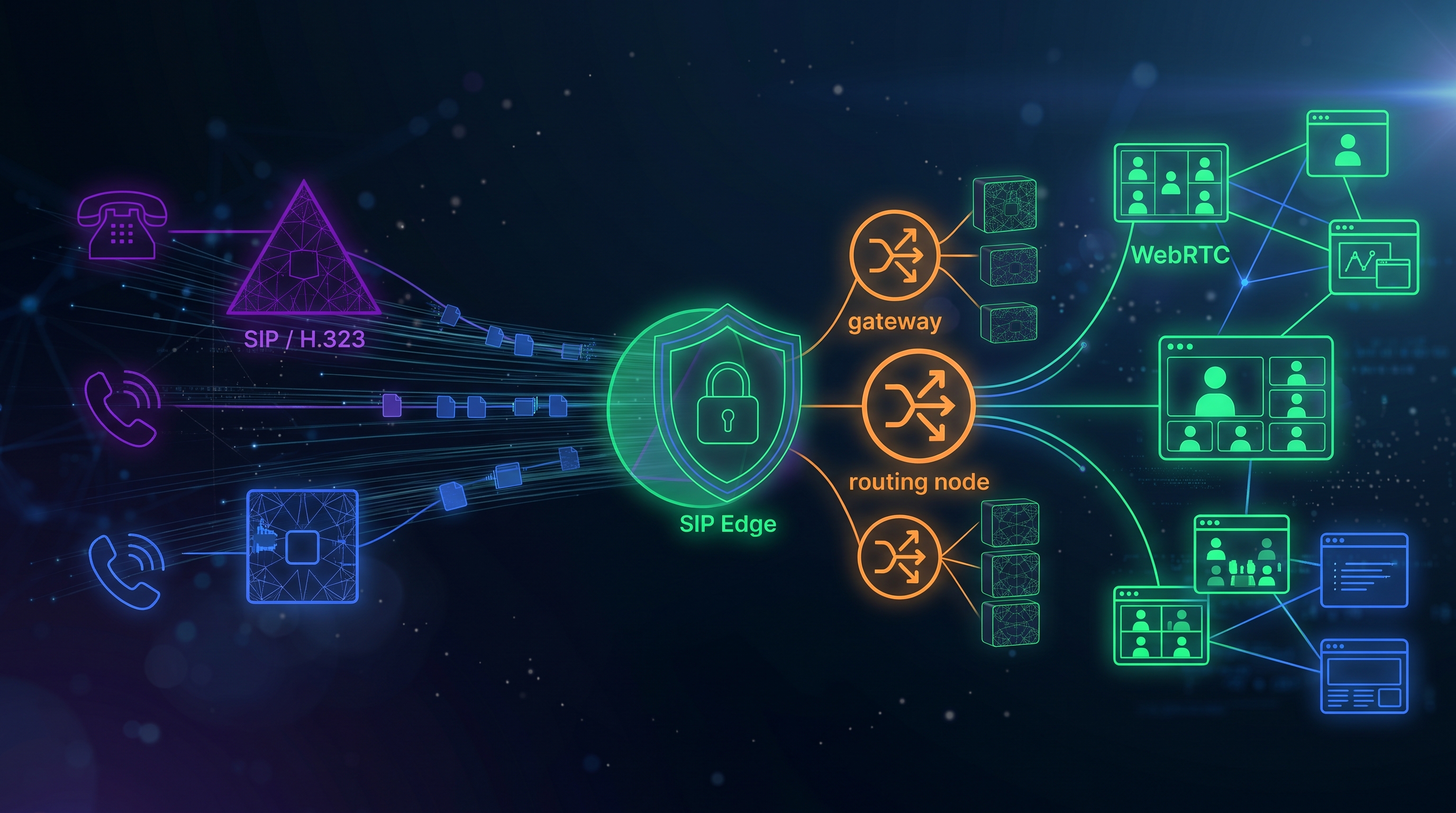
A gateway, not a door
Legacy video-conferencing hardware doesn't get to talk to the rest of the platform directly. A dedicated SIP Edge is the only thing exposed to the public Internet for that traffic at all, handling TLS termination, rate limiting, and an IP allowlist for the trunks it's willing to accept calls from. The SIP Gateway nodes that do the actual work sit behind it, never reachable on their own, horizontally scaled, with SIP Edge deciding which node a given session's traffic goes to.
The problem that only shows up once you scale
A single gateway node is easy to reason about: a call comes in, that node handles it, done. The moment there's more than one node, every operation that isn't "handle the call that just arrived" needs an answer to a question nobody has to ask with one node: which gateway node is actually hosting this session right now? Ending a session cleanly when a meeting finishes, changing a layout mid-call, moving a remote camera, all of it needs that lookup first, and getting it wrong doesn't fail loudly, it just quietly sends a command to a node that was never handling that call.
Bridging two worlds of "sharing your screen"
SIP rooms share content through BFCP; WebRTC participants share a screen through an entirely different mechanism. Making those interchangeable, so a SIP participant's shared content shows up as a normal screen share to everyone else, and the other way around, means the gateway has to understand both protocols well enough to translate between them in real time, not just relay bytes. The same goes for remote camera control: a SIP endpoint that supports FECC can be panned, tilted, and zoomed from inside the call, but only once the gateway speaks that half of the protocol too.
What's gateway-side and what's still work
Getting FECC and MCU layout control working at the protocol level, gateway to hardware, was the first and in some ways easier half. Surfacing either one safely in the web client is its own project: camera control only makes sense for the meeting host, and only for a SIP participant whose device advertises FECC support in the first place, something the interface has to check rather than assume. A control that's visible when it shouldn't be isn't just a UI bug on a platform like this.
Why this and end-to-end encryption don't mix
One constraint comes from somewhere else entirely: the same platform's end-to-end encryption keeps all key material inside each participant's browser, with the server never touching a key. A SIP endpoint has no browser and no way to take part in that exchange, so an encrypted session and a SIP-enabled one are mutually exclusive by design, not a gap still waiting to be closed.
Real depth in both SIP and WebRTC at once is rare enough that solving this the first time, for OpenVidu, is most of what made solving it the second time, for LiveKit, a known problem instead of a research project.