Surveillance VideoWall with OpenVidu (part 1)
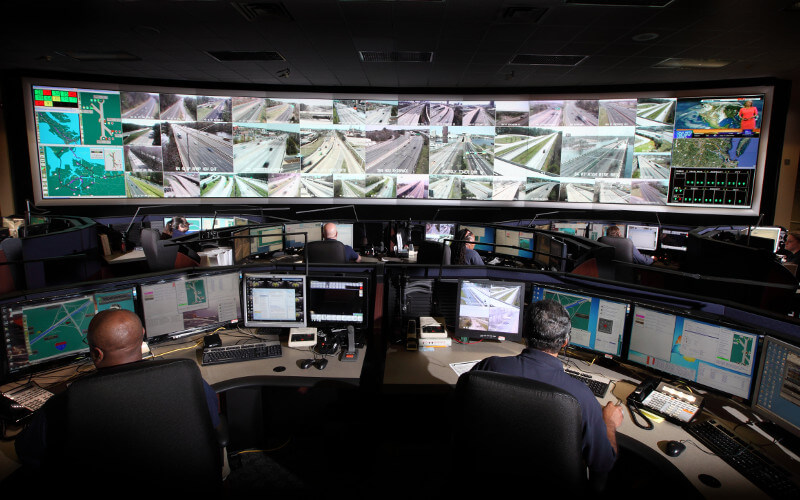
Today we talk about a project that has been outstanding from the beginning, but once in production lacked enough consistency for intensive use.
If we have at our disposal a huge amount of surveillance IP cameras from a city, and we know their GPS location, we can develop a solution that will display the N nearest cameras to a certain GPS point. But when talking about media delivery, things can get messy.
The cameras
The cameras are deployed all around a big city, there are more than a thousand IP cameras. Many of them are property of the final client and many others are from third parties that give explicit permission to consume their cameras' media flows to the final client. As expected, because of the large number of cameras and tenants, the cameras are of many different types and models, and have different properties — codecs, profiles, network capacity, etc. Furthermore, those details are completely unknown before the connection.
So any platform that wants to make use of all these cameras must be compatible with most available cameras in the market. And those that are incompatible should be well defined, so the platform won't be affected if an incompatible camera is requested.
The challenges of media delivery
We'll focus on the challenges of media delivery, since the rest of the challenges that come with handling public cameras (security, volume, privacy, etc.), as well as the challenges of building a good interface, were under control and perfectly addressed by our client.
- Concurrent access to media flows
- And codec compatibility
Concurrent access to media flows
Something that we usually forget when we work in media delivery is that in order to distribute the media from a camera to different users, for each user the camera has to open at least one exclusive communication channel. Therefore if there are 10 users trying to obtain the media flow from a camera, this camera will have to set up 10 different tunnels. This is complex and most commonly used cameras won't support more than a few simultaneous tunnels. However, even if the camera could support those simultaneous tunnels, the bottleneck is the bandwidth, because the camera will be sending media packets through all the tunnels using the same network capacity, so the probability of packet loss and delay multiplies by 10. And over GPRS or Wi-Fi networks this would really be a problem.
In all likelihood this issue may be detected once in production, because it has little impact on functionality until there are many concurrent users. (Because when you don't consider that concurrency can be a problem for media, you also won't think to add it to your tests.)
Solution
The solution is quite straightforward: use a media server that is capable of multiplexing the media flows. The media server should be placed on a machine with good processing capabilities but, more importantly, with enough bandwidth. By taking this approach, the camera will only send one flow to the media server, and the media server will multiplex that flow and serve it to the users — in other words, the media server will be the one maintaining all the communication tunnels needed.
Codec compatibility
Supporting all the different cameras on the market is complicated and costly, and knowing that we are talking about a web platform doesn't simplify it. Browsers — that comply with the WebRTC standard — have limited codec compatibility, and in many cases we will have to transcode the media to be supported by browsers. The transcoding process is "CPU expensive", so most cameras can't run it themselves and will only provide media with a pre-set codec — in some cameras the codec can be chosen within a range.
Solution
In this case the solution is the use of a server or proxy that can transcode so the user's browser can "understand" the media flow it receives. As transcoding is a CPU-expensive process, the machine where the server or proxy is deployed should have enough processing capacity for the expected number of concurrent flows.
THE SOLUTION
In this case Kurento was the first option to cover both challenges, as it fits 100% by definition with the use case — multiplexing of signals and transcoding. But some new challenges appeared:
- It isn't simple to scale — managing Kurento clusters is quite difficult.
- It requires deep knowledge of Kurento components to optimize its behaviour, and it also needs specific Java development to manage the Kurento pipelines in order to add new webrtc-endpoints each time a user requests some media flow.
So we proposed the use of OpenVidu PRO, which wraps Kurento and simplifies its use and provides out-of-the-box Kurento clustering. This way each camera will be represented as an OpenVidu session where users will connect as subscribers to consume its media flow. OpenVidu PRO simplified the management of the media flows with minimal impact on the rest of the project and a big improvement in the user experience.
In the end, what we ended up with was one OpenVidu session per camera, and users who wanted to view a camera were actually (transparently) joining the OpenVidu session serving that camera. With the introduction of OpenVidu PRO, the changes needed to the original code were minimal, but the impact on usage was huge.
But all that glitters is not gold, and other challenges surfaced, mostly related to the displayed quality of video. See part 2.