Surveillance VideoWall with OpenVidu (part 2)
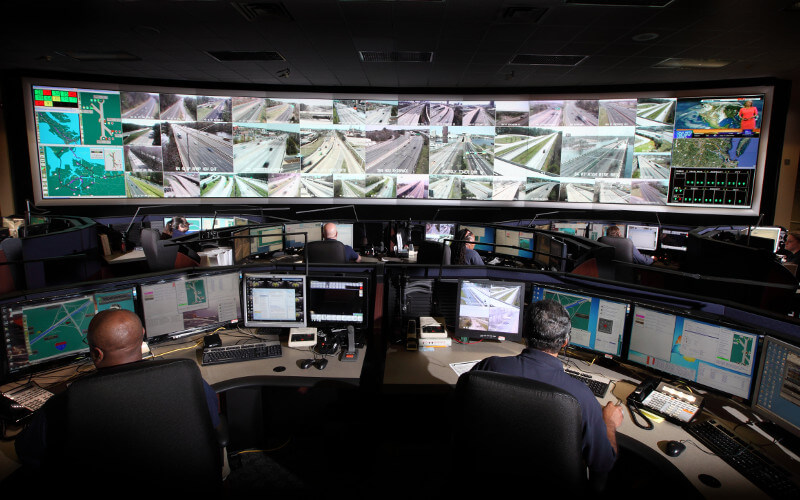
Today we talk about the last challenges we faced on Renacen's Surveillance VideoWall project. Until here we have overcome the concurrency and, partially, the transcoding challenges, but… You can read the first part here.
Already overcome challenges thanks to OpenVidu PRO:
- User concurrent access.
- Transcoding.
New challenges:
- Many cameras still couldn't be played, or played with errors.
- Grey screens.
- Incompatible codecs.
Many cameras still couldn't be played or played with errors
After the inclusion of OpenVidu PRO to the system we reduced the cameras that weren't
displayed properly from about 60% to about 30%. Obviously, in a surveillance platform this
percentage is still too high to be acceptable. Of this 30%, about a third couldn't be played
at all and the rest played with errors. As we already have a transcoding system (Kurento
running behind OpenVidu PRO) we needed to review those video flows that, even after
transcoding in Kurento, weren't showing properly, and compare their specific properties
against Kurento's compatibility specifications. We detected that many of the cameras that
weren't playing properly had the following specifications (obtained with ffprobe):
Codec H264
index=0
codec_name=h264
codec_long_name=H.264 / AVC / MPEG-4 AVC / MPEG-4 part 10
profile=Main
codec_type=video
codec_time_base=1/20
[...]
or
index=0
codec_name=h264
codec_long_name=H.264 / AVC / MPEG-4 AVC / MPEG-4 part 10
profile=High
codec_type=video
codec_time_base=1/20
[...]
Doing a little research we found that Kurento, like most used web browsers and other media servers, is compatible with H264 — as stated by the WebRTC standard. However, if you look deeper you can see that the H264 codec has plenty of variable properties, such as "profile" or "level", which indicate kinds of compression and additional transmission properties. On top of that, H264 is not a "free" codec — in fact it carries royalties — and because of this many browsers and open source projects base their compatibility on the most basic profiles. So whenever we find Medium or High profiles it is highly possible that there is some incompatibility between Kurento, OpenVidu and the browsers, resulting in bad video quality, pixelated images, green frames, or even no flow at all.
Solution
In order to display these video flows we need to add an additional transcoding step where the flow is transcoded to a profile known to Kurento. But this extra transcoding must be applied only when it is really necessary.
To achieve this we designed a component that can discriminate between video flows based on their properties and decide the best transcoding parameters for a media flow — if necessary. This component provides video flows 100% compatible with Kurento while keeping the process as light as possible.
Grey screens
Grey screens usually appear at the beginning of a connection and are a nuisance. However, this is not really an error — it's caused by the way media data is compressed.
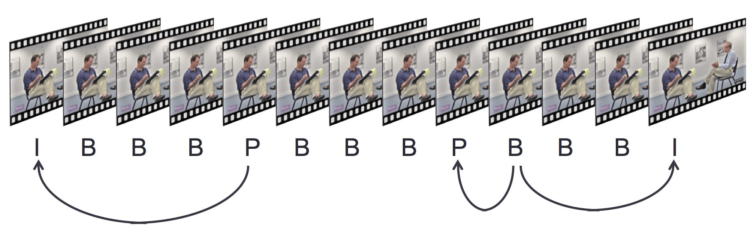
As shown in the image, there are different types of frames: I, B and P. Simplifying a lot, we can say that only I frames contain the whole image — like a photo — while B and P frames only contain the pixels that have changed, the difference. This reduces the amount of data that needs to be sent.
What happens when playing the flow?
Simplifying again, a lot: when a player receives an I frame it gets "painted", and then, as B or P frames arrive, we "paint" the differences until a new I frame arrives and any accumulated errors get corrected. When the first frame received is not an I frame, there are two strategies for how to proceed until the first I frame is received. The first option is to wait for the next I frame, so the media will always play nicely, but this option adds some latency to the connection (up to around 2 minutes). The second option is to "paint" any frame — usually a grey frame with a few painted pixels — and the "grey screen" will disappear as soon as enough accumulated differences arrive or an I frame is received.
How can it be solved?
In this case, transcoding won't improve the flow, nor will any other middle component. One way to solve or at least reduce the nuisance is by acting on the camera. You may configure the camera — the codec — to send I frames at a faster rate. However, that will have an impact on bandwidth, as the video data will be much larger.
Incompatible codecs
In addition to the challenges already explained, we found a minimal number of cameras that were completely incompatible and would need a heavy transcoding process. These cameras were emitting H265 at large resolutions.
The H265 codec is not on the compatibility list of the current WebRTC definition, so most browsers and Kurento aren't compatible with it. What's more, we found that even when Kurento is able to receive an H265 flow and transcode it with moderate success, once the media flow stops, Kurento finds itself in an inconsistent state and stops working properly for that flow — or any others — without being able to recover. This represents a critical failure, thankfully very rarely found.
The solution
The solution is simple: never allow any H265 flow to reach Kurento, by intercepting all H265 flows and either raising an error or transcoding it. In this case, taking into account that the number of H265 flows and their associated resolutions were huge, the decision taken was to raise errors. Transcoding such large H265 flows would have taken a large amount of computing resources and would have affected the transcoding of other flows.
Conclusion
When talking about media delivery there are many variables that have unexpected effects. In this project we worked with more than 1000 real-time cameras where it isn't possible to know the properties of the cameras and their produced flows in advance. A detailed analysis of a sample of the available flows, and a custom, configurable "on the go" solution, has been our main objective throughout.
You can read more about this project with Renacen in Live RTSP cameras integration in web services for public administrations.